A clear check-in point
A mounted iPad at the entrance makes it immediately obvious where visitors sign in, without anyone needing to explain the process.
iPad visitor kiosk
Lobbipad is an iPad-based visitor management system for businesses. An iPad at your entrance becomes the check-in point: visitors sign themselves in, their host is notified automatically and every visit is recorded digitally.
Manage visitor questions, branding, notifications and visitor records centrally, while each iPad provides a simple self-service check-in experience at the entrance.
An iPad visitor management system replaces the paper visitor book or a manual reception process with a digital check-in point at the entrance. Visitors register on the iPad, the system notifies the person they are visiting and the visit is stored as a digital record instead of a handwritten line.
With Lobbipad, the iPad is the visitor-facing check-in interface. Visitor information, notification settings, branding and visitor records are handled in the Lobbipad environment, so reception and administrators work in one place while visitors only see the check-in screen.
For the complete product overview, see Visitor Management.
Why an iPad
A mounted iPad at the entrance makes it immediately obvious where visitors sign in, without anyone needing to explain the process.
Visitors can complete the check-in themselves, at staffed receptions as well as at entrances without permanent reception staff.
Check-in runs on its own device, so visitors never need access to a reception computer or a shared workstation.
Within one licensed location, you can connect multiple iPads at no additional software license cost — ideal for sites with several entrances.
Step by step
The visitor starts the check-in on the iPad, or uses the QR code they received when they were pre-registered.
The visitor completes the information you ask for and can be shown safety instructions, agreements or terms where these are configured.
The host notification is sent automatically, through the channel configured for your organisation and plan.
Where badge printing is configured, a visitor badge is printed. The visitor appears in the live visitor overview as on site.
The visitor checks out and the visit is kept in the visitor history according to your configured visitor-data settings.
Visits can be prepared before the guest arrives. A pre-registered visitor receives a personal QR code, which they scan at the iPad to complete check-in in seconds.
Because the visit already exists in Lobbipad, reception and hosts know who is expected before anyone walks through the door.
When a visitor checks in on the iPad, their host is notified automatically — no phone calls or walking through the building.
Visitors Plus includes email notifications for hosts. Visitors Pro adds notifications by email, SMS and MS Teams.
Visitor badge printing is optional. When it is configured, a badge is printed as part of the check-in, so visitors are clearly identifiable while they are on site.
A printer is not required to use Lobbipad — visitor check-in on the iPad works with or without badge printing.
Supported badge printer
Brother QL-820NWB
The badge printer used and supported by Lobbipad. It connects to the check-in setup and prints the visitor badge automatically when badge printing is configured.
Hardware
A Lobbipad check-in point is a short list of practical parts. You can buy the hardware yourself, or order it through Lobbipad.
Required
Optional
When you order the hardware through Lobbipad, we can prepare the setup so it arrives plug-and-play and is ready to use at your entrance.
Hardware
Lobbipad works with Bouncepad iPad stands in different configurations, so you can choose a setup that fits your reception, entrance or workspace.
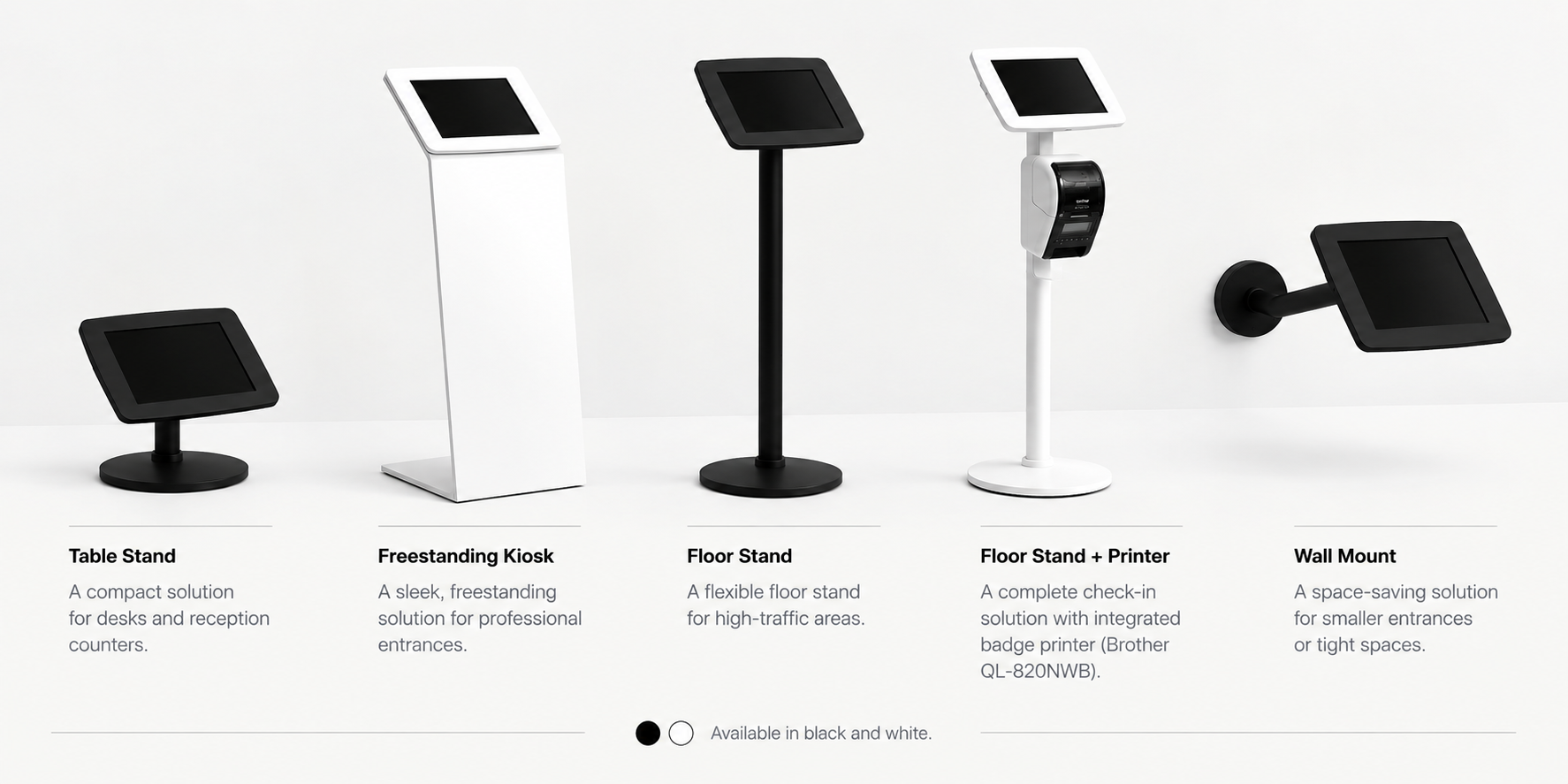
Common configurations include tabletop, freestanding, floor-standing, printer-equipped and wall-mounted setups. Other configurations are also possible.
Your own brandingKiosk hardware can be customised with your company logo, colours or artwork to match your organisation's look and feel.
Visitor registration involves personal data. Lobbipad is designed with data protection and security in mind, using established cloud infrastructure, access controls and secure data transmission.
Lobbipad provides features that support GDPR-compliant visitor registration. How you configure questions, notifications and retention remains your organisation's own responsibility.
Implementation
A Lobbipad visitor kiosk can be set up quickly. When you order the hardware through Lobbipad, we can prepare the setup plug-and-play.
Prepare the iPad and mount it in its stand at the entrance.
Install Lobbipad on the iPad.
Connect the iPad to your Lobbipad environment.
Configure your visitor questions, documents and branding.
Configure badge printing if you use a badge printer.
Prepare the entrance and point visitors to the kiosk.
You can also order the iPad, stand and optional badge printer through Lobbipad. We prepare the hardware so the setup arrives plug-and-play.
Integrations
Lobbipad integrates with the tools your organisation already relies on — from communication and calendar tools to identity management and network infrastructure. Other software can be connected through the Lobbipad API. All API integrations are part of Visitors Pro.
Explore all features of our digital visitor management system.
Entrances & locations
Each physical location requires its own Lobbipad license. Within one licensed location, you can connect multiple iPads at no additional software license cost.
Example: a physical location with three entrances can use three iPads under that location license.
A separate physical location requires its own location license. Organisations with several sites can still run the same visitor registration process everywhere.
Example: a head office and a production site are two locations, so each one needs its own license.
Pricing
Each physical location requires its own Lobbipad license. Pricing per location is based on the number of hosts who can receive visitors — not on the number of iPads you use within that location.
Within one licensed location, you can connect multiple iPads at no additional software license cost. A separate physical location requires its own location license.
Visitors Plus
from €41/month
All visitor management features, pre-registration with personal QR code, email notifications for hosts, visitor log and evacuation list, 24/7 support.
Visitors Pro
from €61/month
Everything in Visitors Plus, plus notifications by email, SMS and MS Teams and all API integrations.
Prices excluding VAT. A 30-day free trial is available, no credit card required.
Start with iPad-based visitor check-in: a 30-day free trial, no credit card required, and a kiosk setup that can be up and running quickly.
Also checking in employees at the same entrance? See Employee Check-ins.